Drop in a raw clip. Get back a reel ready to post.
Real output, no touch-ups: one command on a 22-second raw clip. The pauses were cut and the captions, zooms, B-roll and music were added automatically.
Launch price ends on 26 Oct 2026. After that, Cutkaar is ₹1,500.
What it does to every video
- Captions synced to each word, in 3 styles, with your brand colour
- Cuts the pauses so the video never drags
- Frames you for 9:16 by finding your face, even in landscape footage
- Punch-in zooms on new sentences and key words
- B-roll inserts from your own photos and clips
- Music that dips under your voice and rises in the gaps
- Hook headline on the first 2.5 seconds, then an MP4 export at 1080×1920
Three caption styles
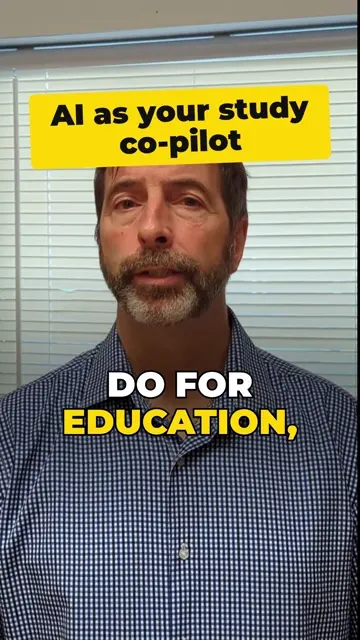
Pop
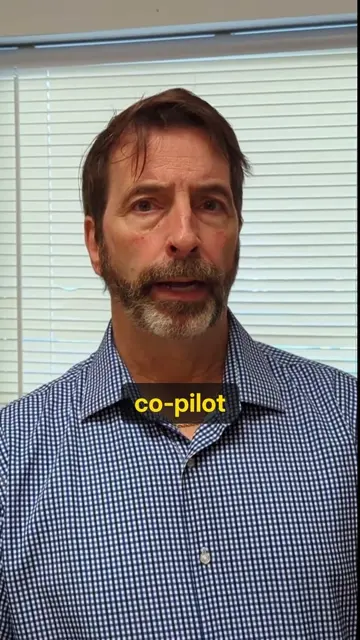
Clean
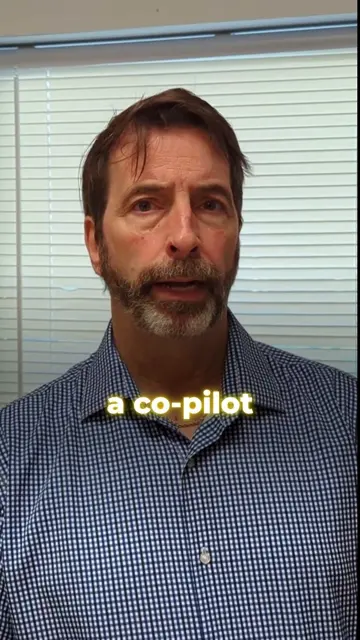
Glow
How it works
- Add it to your AI assistant once. Copy one folder in and run a 10-minute setup. The PDF walks you through it.
- Ask in plain words."Edit raw.mp4 into a reel. Pop style, use my B-roll folder, hook: 3 mistakes new creators make."
- Get the MP4. A 30-second clip takes about 1–3 minutes on a recent laptop. Your assistant checks the frames before it hands the video back.
What you need
A Mac, Windows or Linux laptop. Editing runs on your computer, not your phone.
An AI assistant that can run commands on that computer, or the included step-by-step mode for chat-only assistants.
Free tools: Python, FFmpeg and Node.js. Setup installs them. No paid keys, no monthly plan, and your videos never get uploaded.
What you get
- The skill folder: the editing engine, 3 caption styles and a rights-free music bed
- A chat-only version for assistants that can't run commands
- A quick-start PDF with Mac and Windows setup
- A frame checker that makes a contact sheet so you can review a reel in 5 seconds
- Use it on client work. Your videos are yours, and updates are free.
Questions
Do I need to know editing or coding?
No. You ask your assistant in plain words. You'll paste a few install commands once, and the PDF shows each one.
Does it work for Hindi or Hinglish?
English is what we have tested most. For Hindi, ask for Hindi captions and it switches to a multilingual speech model. Accuracy varies with audio quality, so check the captions (especially names) before you post.
Is there a monthly fee or a limit on videos?
No. You pay once and edit as many videos as you like. It all runs on your own computer.
Can I use my own music and fonts?
Yes. Point it at any track you have rights to. Fonts and colours are set in one place in the style file.
Will it work on my phone?
No. The editing needs a laptop or desktop. You can film on your phone, copy the clip to the laptop, then post the finished reel from your phone.
How do I get the files?
Right after you pay, your order email has a download link. If it expires, reply to that email and we'll send a new one.
Can I get a refund?
Yes. Cutkaar has a 7-day money-back guarantee: email assistant@laceai.in within 7 days of your order with your order number and we'll refund you in full. If setup gets stuck, write to the same address and a person will help you finish it. Refund policy